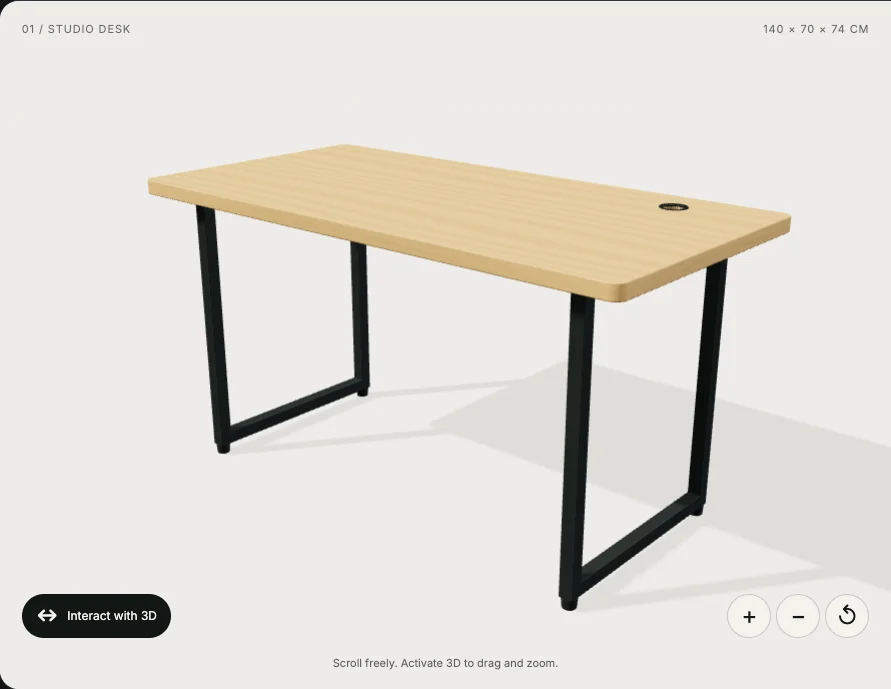
An interactive 3D product viewer lets someone rotate an object and examine it from different angles. A configurator goes further: it lets them change options such as materials, colours or components, subject to the product's rules.
Both can be useful when a buying decision depends on something that is difficult to explain with a few photographs. Before commissioning one, identify the question you want the customer to answer. That question should guide the model, controls and development scope.
Start with a specific customer question
Imagine a furniture company selling a desk with several frame colours and surface finishes. A customer may want to see how a particular combination looks, where the cable opening sits, or how the frame connects to the desktop.
A viewer could help with the angles and construction. A configurator could show valid combinations. Dimensions still need clear labels, and a digital material preview should be accompanied by photographs or physical samples when the exact finish matters.
Useful starting questions include:
- How does the product look from the back or underneath?
- How do the available parts fit together?
- What changes when I select a different component?
- Which combinations can I actually order?
If the customer mainly needs a size chart, delivery information or a close photograph of a texture, provide those directly. Match the presentation to the information they need.
Choose the right level of interaction
A viewer and a configurator are different development projects. Agreeing on the distinction early helps keep the scope manageable.
| Experience | What the customer can do | What the project needs |
|---|---|---|
| Product viewer | Rotate, zoom and examine a fixed product | A suitable model, lighting and usable controls |
| Variant preview | Switch a finish, colour or predefined model | Assets and a reliable mapping to product variants |
| Product configurator | Assemble a valid combination of options | Configuration rules and a defined output |
| Configurator connected to a shop | Send the chosen configuration into an order | Product identifiers, pricing logic and shop integration |
A prototype can begin with one representative product and a small set of options. That makes it easier to discover asset problems and unclear interactions before extending the system across a catalogue.
The product model is part of the work
Having a CAD file does not automatically mean the product is ready for a browser. The source may contain internal parts, very detailed geometry or materials intended for another rendering environment.
The model needs enough detail to explain the product while remaining practical to download and render. Preparation may include simplifying geometry, organising selectable parts, preparing textures and checking proportions against the real object.
For a desk, a customer may need to inspect the shape of the frame. They are unlikely to benefit from every hidden screw being modelled in full detail. Decisions like this affect both the preparation work and the experience on a phone.
Establish who supplies the models, who prepares them for the web, and how new products will be added later.
Keep the product information usable on mobile
A viewer occupies screen space and introduces unfamiliar gestures. On a phone, dragging to rotate the product can also conflict with scrolling the page.
The interaction needs a clear boundary, visible controls and a way to return to a useful angle. Important options should have text labels. If a customer selects a finish, the chosen finish should also appear in a readable summary.
Keep photographs, specifications and the main contact or purchase action available while the viewer loads. Consider what happens when the device cannot run the experience successfully. A customer should still be able to understand the offer and take the next step.
Plan what happens after the customer makes a choice
A configurable preview becomes useful to the business when its selections produce a clear result. That could be a specification attached to an enquiry, a saved configuration or an item in a shopping cart.
For a shop integration, the displayed combination needs to correspond to valid product data. Prices, unavailable options and incompatible components need defined rules. A material change on screen is only one part of that system.
For a sales enquiry, a simpler result may be enough: a list of selected options sent alongside the customer's message. Decide what the recipient needs to fulfil or quote the request before designing the final step.
Decide how you will measure usefulness
Choose measures related to the task. These might include completed configurations, enquiries containing a configuration, or recurring questions that customers still ask after using the viewer.
Viewer interactions can help diagnose whether people discover the feature. More rotation or longer visits alone do not establish that it improves sales. Evaluate the experience alongside the product, traffic source and customer journey before drawing that conclusion.
What to include in a project brief
Share a representative product, the question the viewer should answer, the available model files, and the options a customer can select. Include the target devices and describe what should happen after a selection is complete.
Try the interactive desk demo above to explore rotation, preset views and finish options. It demonstrates the interaction; it does not establish a client's sales results.
I build interactive web experiences using Three.js and WebGL. See my animation and 3D services, or tell me about your product. We can start by defining the smallest useful version of the experience.
Would a 3D view help your customers?
A product viewer or interactive element needs a clear purpose, suitable assets and a usable mobile experience. I can help define that scope and build the interaction into your website.
